| Candidate Name | Amy Elliott (6000536) |
| Pathway | Art & UX (UI/UX Mechanics and Visuals) |
| Project Title | FORGOTTEN (project name will come with time) |
| Section 1: Review |
After the time I have spent in this course, I have learnt a lot which I am really glad to have learnt, for example, using 3D Modelling, Art and Programming, this course has most definitely opened my eyes to what working in the games industry could be like since beforehand I didn’t know too much about all of this, through this course I have learnt how to use Maya, Substance painter and Unity and I’m comfortable with using them now, I learnt how to make a basic game and how to do research to acquire ideas to use in project concepts, another thing which I think was really useful, but a bit out of the box would be how to use Wordpress, honestly, I’m so glad to have learnt how to use it as now I can make myself a website and publish my work on my own blog, and I enjoy making progress updates on my blog as it is like my own diary, this has made me realise, if I don’t do so well in the future with getting a career in the industry, I can make my own game, and my own blog which I can put my contact details on, like a portfolio, and then people will see this blog and contact me asking for work, and another reason a blog would be really useful is because it is like a portfolio, which I can build upon and people can see my improvement.
I’m really proud to have learnt how Unity 5 works, as you can make so many projects through Unity 5, I find it really fun to make my own games using the program, and on the plus side it’s free! – Along with Unity comes my progress with leaning C# through Visual Studio on Unity, I think the programming I have learnt has been very useful to me as there is a lot of pathways open for a programmer to do since it is the harder path to go down, so this has made me realise how much I want to now expand my knowledge of C# and other language to get as good as I can at programming.
I have also learnt the basics of how 3D Modelling and texturing works, and this has made me realise how much work modellers put into beautiful games to make them stand out and look appetising. – Learning how texturing works in games has really opened my eyes as beforehand I never knew about Normal maps ETC, and now I have, they have struck an interest in me on how they work and manipulate with the shaders within the program to make a surface shiny, or bumpy without there actually being bumps there.
https://sketchfab.com/3d-models/old-dagger-970ba5c6b4994089a128eb5995468977
Before I started the course I knew the basics on both Programming and 3D Modelling, I used to do quite a lot of Python programming in my spare time and at school, and I found it really fun and would love if I can pursue in this direction if only I had more knowledge at the back of my hand right now, I know I would’ve.
And with 3D Modelling, I used to rip models out of games and put them into Blender, play around with the lighting and textures and make many crazy pictures, I have also tried 3D Modelling low-poly objects beforehand, but when I did, now I look back on it I did make a lot of basic mistakes, like not deleting faces etc.
Before I started the course, I did know a lot about art and how to use Photoshop as I had been using Photoshop for 4 years prior, as with art, I got into digital art very early when I started to draw, and have been doing digital a lot more then I have been doing traditional art, I also had a lot of knowledge on anatomy and lighting as I had been doing art challenges on my Instagram where I draw, say, something like a hand for one day, and then I’ll draw some lips the next day, I focused a bit more on semi-realism back then, but now, for the past year I’ve been focusing on realism but I know art isn’t the path I solely want to go down since, in my own opinion, I don’t think there is too many paths for artists in comparison to programmers, so I would much rather play safe and learn different, unique pathways for a game developer so I can have more knowledge on my back to show at an interview instead of relying on art and nothing else.
This course has in fact influenced my choice of pathway a great deal, as I didn’t really pay attention to the smaller details in a game, but now I’m in this course I realize how important the small things like menus and options are, and, I enjoy working with both art and programming, so this in my opinion would be ideal.
| Section 2: Project Concept |
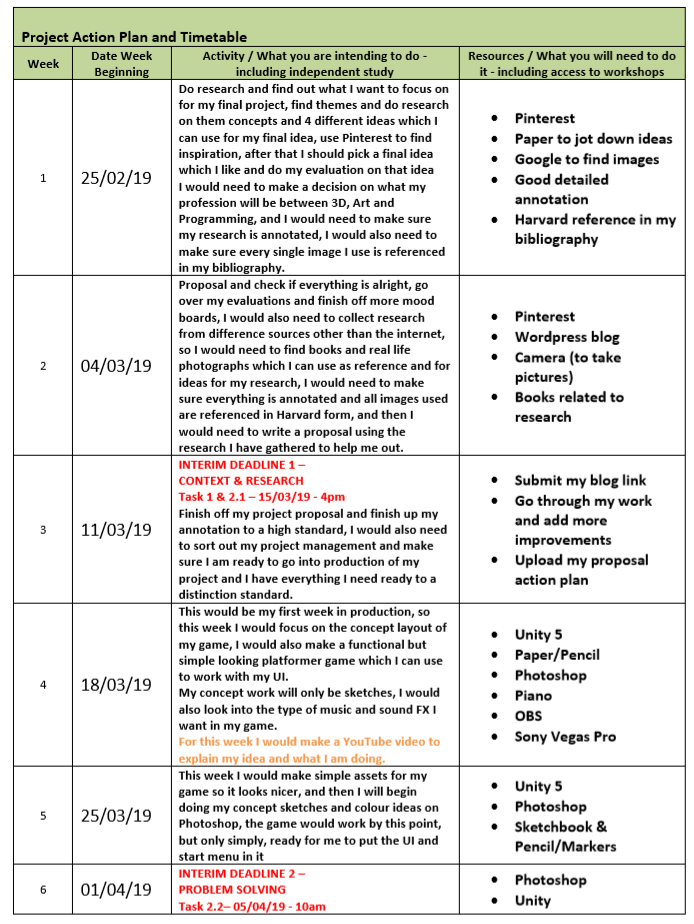
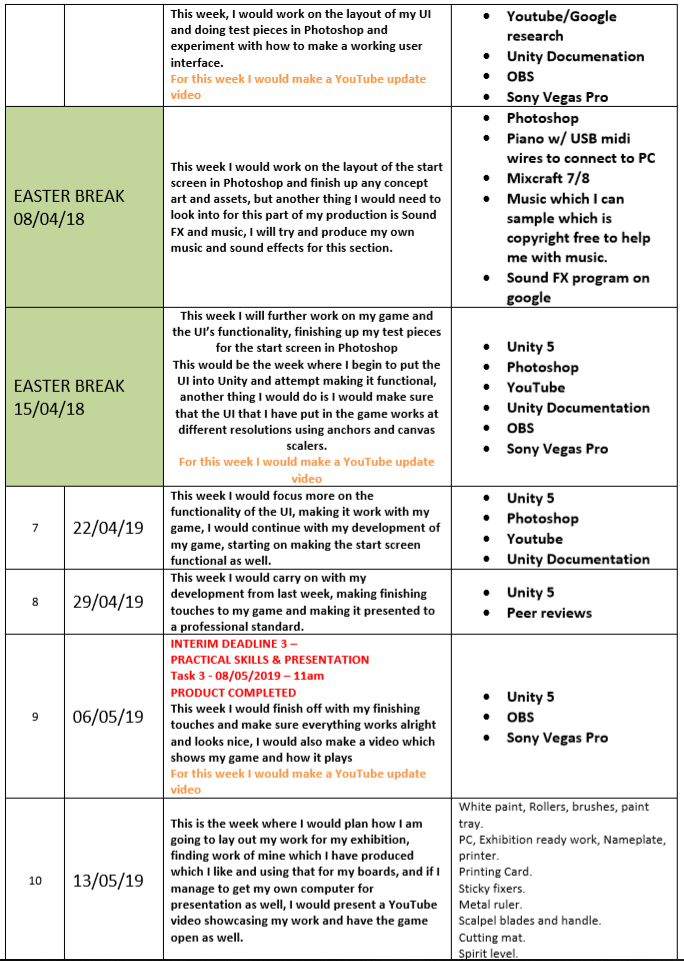
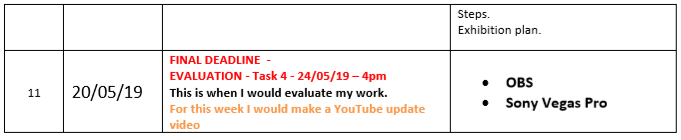
My idea is that I wanted to do a game based on flowers which have been forgotten in a field of flowers the town they’re in is a forgotten village infected by weeds, as they’re being attacked by growing weeds which take all of the water they need to stay alive, the flowers need to destroy the weeds with help from their army of butterflies and bees to get their water resource back. So, my idea is to make UI for a game like this, and I will try my best to make it functional, and set the atmosphere of the game, to do this I wanted to make use of music and sound effects in the menus, I need to also make sure the UI works effectively on different screen ratios and resolutions.
This theme links to forgotten as the flowers village has been infected by the weed monsters, and all of the flowers in the field have moved out of the way of that village so theirs doesn’t get infected. So the flowers are forgotten and alone in the huge field of weeds.
What are you going to create? – List items/Assets. Be specific.
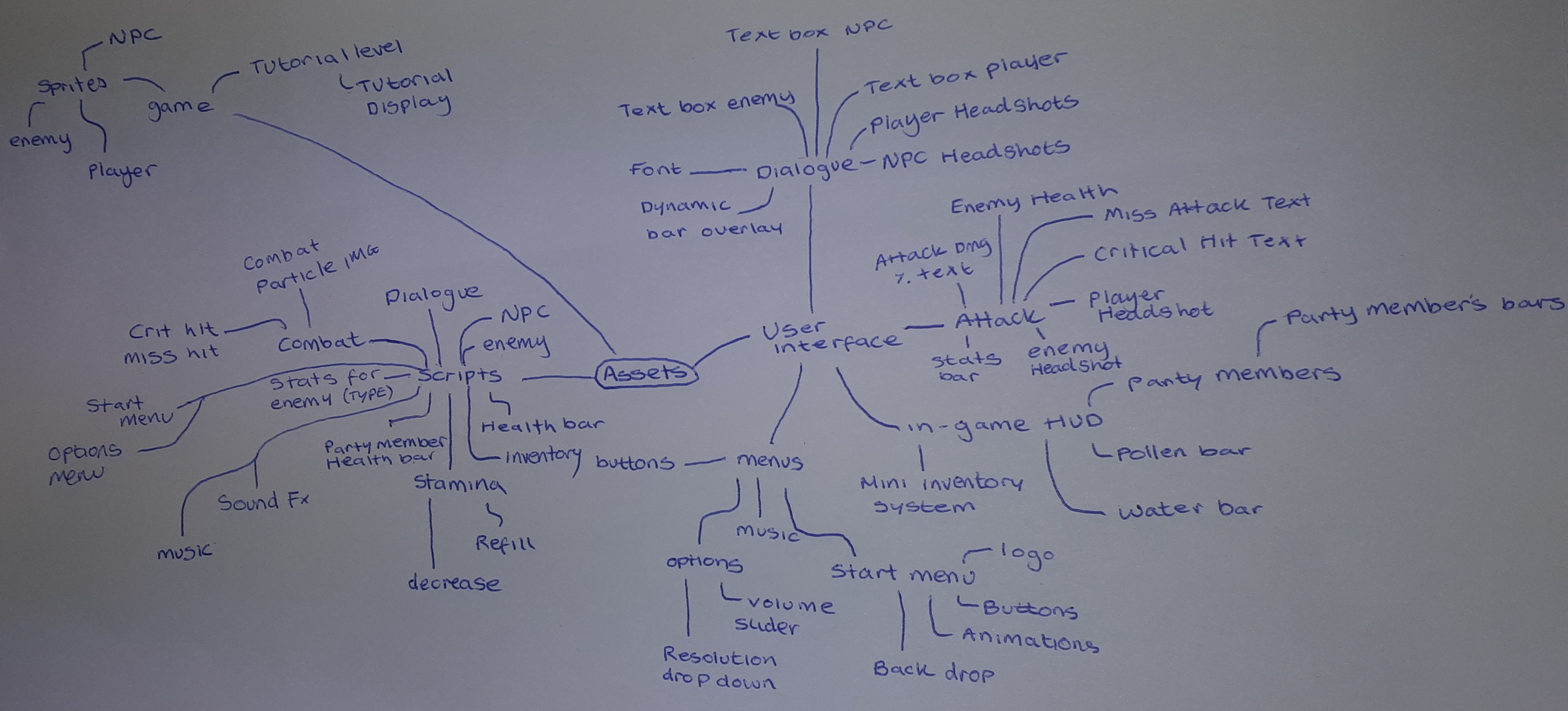
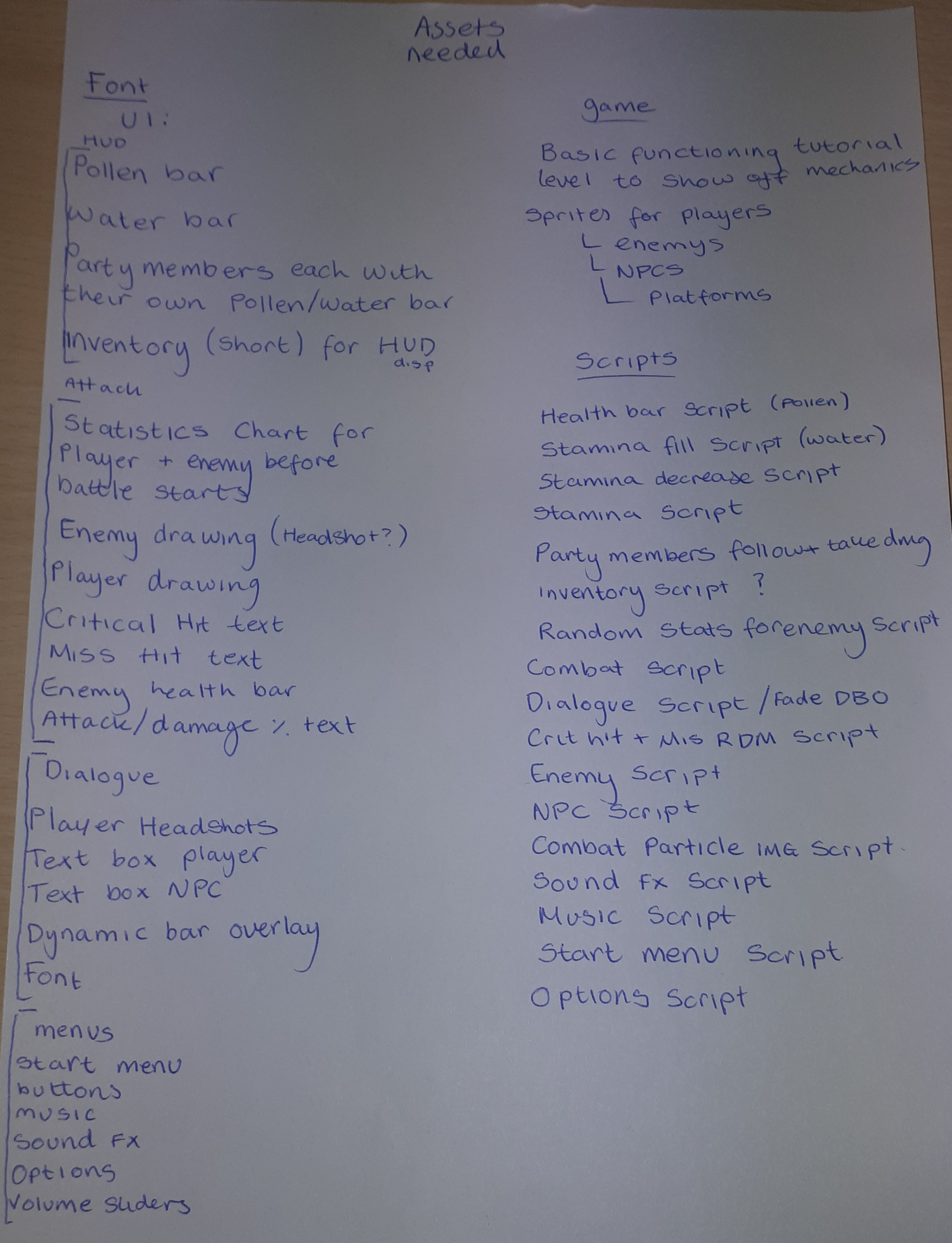
After doing this, I realized that my list was too much to produce in time, so I began reducing it to a sensible amount of stuff I can make.
For my project, I think it would be good that I make some working UI and leave the very advanced UI (Party members) nonfunctional but looking nice and fitting in with the game.
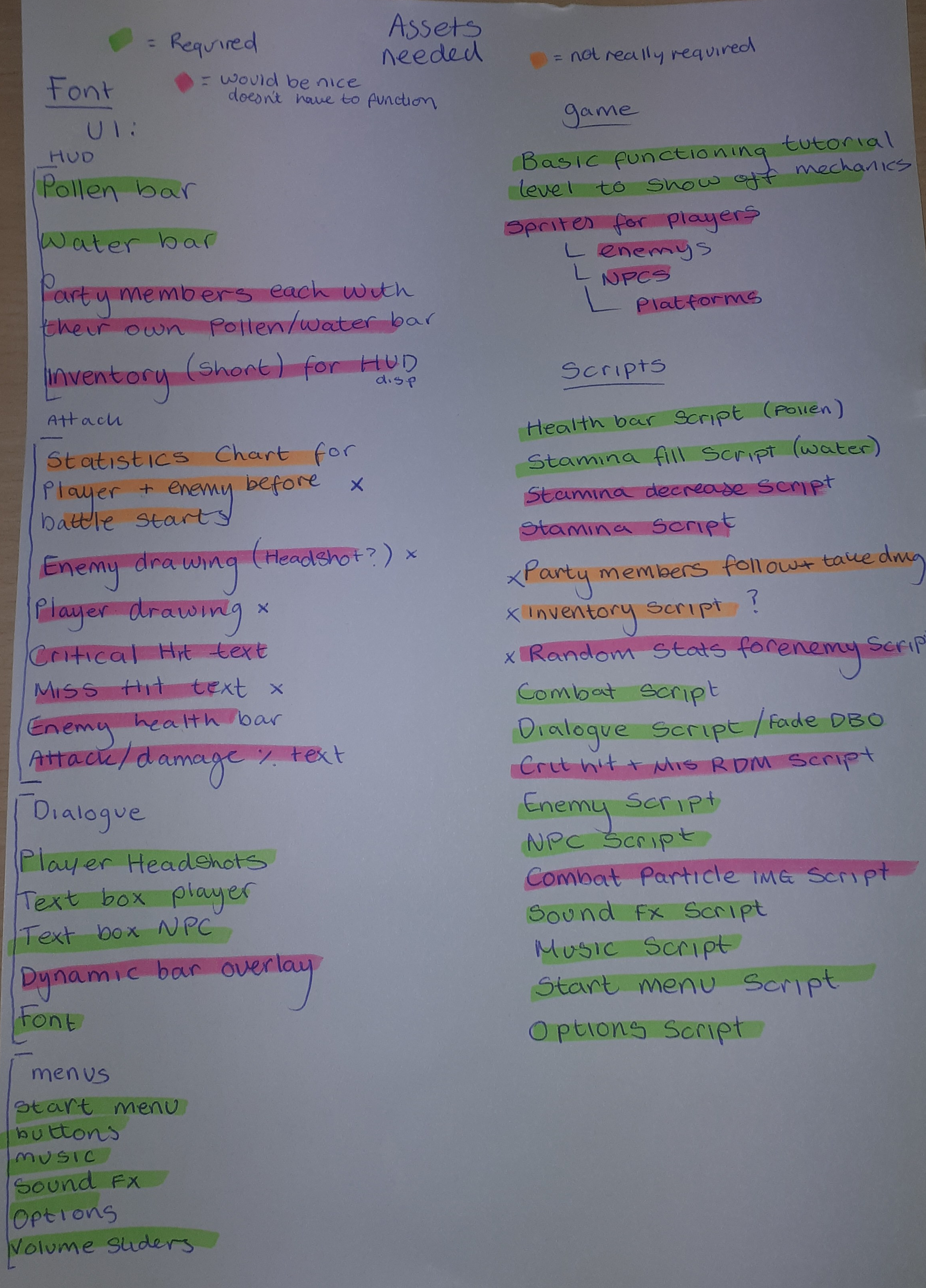
So my assets would include health bars, character art, buttons, fonts, animations, sliders, text boxes, overlays and much more, I would need to make sure these look as nice and artistic as I can, and make sure they blend in nicely with the scene. I also think there will be 3 levels/scenes within my game. The start scene, the tutorial level and the first level, and in between all of these I would make a loading screen.
What software/materials are you going to use?
The software I will be using would be Unity, Visual Studio, Photoshop and traditional. I plan to use Unity to make my game, and then I will be using Visual Studio to program my game, I will be using Photoshop to plan out how my menus and UI would look like whilst also making that UI in Photoshop, creating the separate layers of the UI in Photoshop and putting it together and then using a Photoshop script to upload all images as PNG, I will also be using Adobe Illustrator for my logo and perhaps a few assets and shapes here and there. I will be using traditional art to make my concept art and sketch out any really rough thumbnail ideas, which I can adapt. Another software I will be using is Trello to make.
The materials I will be using will include Youtube, Unity Documentation, books, Anatomy websites, Colour chart websites, flow diagram websites, games and applications.
I will be using Youtube to find resources which teach you about how to do something, for example if I wanted to figure out how to make a functional options menu I would refer to youtube and Unity Documentation, I would also use youtube to help me with how to make a design which works efficiently.
I will be using books as research as well, as you can get books which show concept art, and books which show how to draw anatomy, and then you get books which explain the mechanics and behind the scenes of how some game mechanics work and are made.
I would use websites which show lots of lists of colour charts so I can find a colour combination which fits in nicely with each other that I can use for certain parts of my UI.
I will be using flow diagram websites to plan out how I would code my work and how everything in-game would flow, what menus and buttons bring you to what scene or object etc.
| Section 3: Evaluation |
When I’m not happy with my work, I will reflect on it by looking at it from afar, and trying to figure out what the fault is with my work, since I’m doing UI, the fault would be either art based or programming based, If it’s art based and I just don’t like the look of the UI, I would begin by thinking - what is it that I don’t like about it, as it could be 1 of many things, the use of colour, the line-weight, the textures, so on so forth, if I find something I’m not happy about, I will adjust that so I am happy with it, and hopefully everything should look good, but if it doesn’t I would then try again, start from fresh with different line weight. If I don’t like the small details, what I would do is I would go over the details again, perhaps find some details I can reference from on google and use those to help me. If I don’t like the use of colour I will adjust the colour using the Selective Colour adjustment on Photoshop or the Hue and Saturation, if it’s something else, like the lightness or the contrast, I will work with that and change those parts of it until it looks nicer, if I’m stuck with choosing colours, what I would do is I would go on Google and find a nice looking colour pallet, or I would find a game which I know has nice colours on it and use that as reference, if all else fails, I would start from the beginning again, remaking the parts of the UI which I don’t like, and if it still doesn’t look good, I will go back to my original concept of it and try a different design, like changing something like where certain bits of the UI is placed. If I’m not happy with it after all of that, I would ask peers to help me with anything that doesn’t look right, taking their criticism and improving my concept and going back into the piece again, if I don’t like it after all that time, I would most likely pick a different design.
If I’m stuck with programming, I would check what the error is in my code and hopefully debug it, if I’m not sure what the error means, I can do a simple google search on the subject and hopefully fix it then, if that doesn’t help I will ask a peer or a teacher to help me out which knows more about programming, if I have the problem of trying to implement some programming which I’m not sure how to program, I will begin by making a flow diagram, how is it meant to work, what is required to make it work? If that doesn’t help I would go onto google and search up what I needed to make, for example ‘Health bar’ - if I didn’t know how to do a health bar in unity I would use unity documentation and youtube to search up how other people have done theirs and then use the stuff I learnt from their video to make my own, if all else fails, I will either ask people on a programming C# Unity forum or a teacher.
If I have a problem halfway production, like for example; if I’m not happy with a character design or I cannot pick between 2 different ones I would ask a group of friends to help me pick on which one they like and why, that way, if I get equal votes on 2 characters I can see why they like the character and mash them both together so the character has the positive attributes of both of the characters in one singular character, if I don’t do that, perhaps I can use the latter design for a design for another character. Or if I’m programming something and I get stuck whilst doing it, I can always ask for a teachers help.
I would look at my work and test it multiple times, just to check everything is functioning, another thing I would check is the resolution, I will test it all at different resolutions and see if the UI looks okay on these resolutions, as sometimes you could forget to anchor something and it disappears in the final build because it’s off screen or it’s too small and this would all be down to how you anchor an object, another thing I would test is for any bugs, this includes the health bar going below 0 etc, and then after that, I would ask my parents, a teacher or a friend to peer review my work and tell me what is good and what could be improved, this way I can make finishing touches.
I will make blog progress posts and videos which document all the different changes I make in that day of development, I plan to record as much as I can, on my videos I will go over the bigger changes and in my text I will go over all the smaller changes and mistakes, if I can’t get anything big working I will state that in the video.
| Proposed Research Sources and Bibliography (Harvard Format) |
Nicobass. (2017). Tomb Raider II – Dagger Of Xian REMAKE DEMO

SQUARE ENIX (2010). NieR Gestalt

SQUARE ENIX (2017). NieR Automata

NINTENDO OF AMERICA INC. (2017). The Legend of Zelda: Breath Of The Wild.

Dark Horse (2013) The Art of The Last of Us

My own shoots in ruins (2018) – Boxgrove Priory

Dark Horse Books (2018). The Legend of Zelda: Breath of the Wild – Creating a Champion Art Book

PopCap Games (2009). Plants VS. Zombies

Studio Ghibli (1984). Nausicaa: Valley of the Wind

Studio Ghibli (1997). Princess Mononoke

Picture I took (2017) – Arundel Castle

Picture I took (2017) – Chichester Cathedral

Dark Horse (2013) – The Art of Bioshock Infinite

EDGE #279 May 2015 (2015) – Kirby & The Rainbow Paintbrush

Ubisoft Entertainment SA (2007) - Heroes of Might & Magic Complete Edition Book

EDGE #279 May (2015) – Ori And The Blind Forest

Nintendo. (1998). Ocarina of Time

Square Enix Co., Ltd., Square. (2003) Final Fantasy Tactics Advance

Intelligent Systems, Nintendo (2015) Fire Emblem Fates

Sega, Media.Vision(2018) Valkyria Chronicles 4

Level-5 (2018) Ni no Kuni II: Revenant Kingdom

EpicMealDev (2019-) Watashi No Mono

Nintendo. (2017) Breath Of The Wild

Nintendo (2002) Super Mario Sunshine

Lap Pun Cheung – The Departed – Cinematic Keyframes – An Adventure Awaits https://c780162.artstation.com/projects/xP8KO

Nintendo (2004) The Legend Of Zelda- The Minish Cap

Level-5, SIE Japan Studio (2002) Dark Cloud 2

Level-5, Studio Ghibli(2013) Ni no Kuni: Wrath of the White Witch

Iwato kagura no kigen (岩戸神楽之起顕) – Origin of Music and Dance at the Rock Door signed by Shunsai Toshimasa (春斎年昌); Dated Meiji 20 (1887)

Monaghan, Patricia (1994). O Mother Sun! A New View of the Cosmic Feminine. California: The Crossing Press

Adrian Evans Photography (2012) -Cathedral Window

Ross Bolleter ruined piano (www.davidkotlowy.com)

Nintendo (2002) Super Mario Sunshine